
Editing engine (advanced): switching to ATLAS and back

Impossible Things edits with HELIOS. If you want the results you were used to from plug-in 1.92, you can switch to ATLAS, the engine 1.92 used, editing with the learning 1.92 built on your computer.
ATLAS is a temporary fallback. It is there so nobody is stranded by the engine change, and it will be retired in a future version. Use it to buy time while you Quick Tune your presets and Learn on HELIOS – not as a permanent setting.
Give HELIOS a real try first: Quick Tune your preset, edit a small batch, then run Learn.
Can I get my old learning back?
Two halves belong together here. Your old learning cannot be loaded into HELIOS – the two engines learn differently, so HELIOS starts fresh and learns your style again from your finished edits, usually with far fewer photos than before. Your old learning is still there and still usable: on your first Edit after updating, the plug-in archived it on that computer, and ATLAS edits with it. Switching to ATLAS is how you keep using it.
How to switch engines
- Open File ▸ Plug-in Manager ▸ Impossible Things.
- Scroll to the bottom section, Editing engine (advanced).
- Choose ATLAS (legacy) or HELIOS.
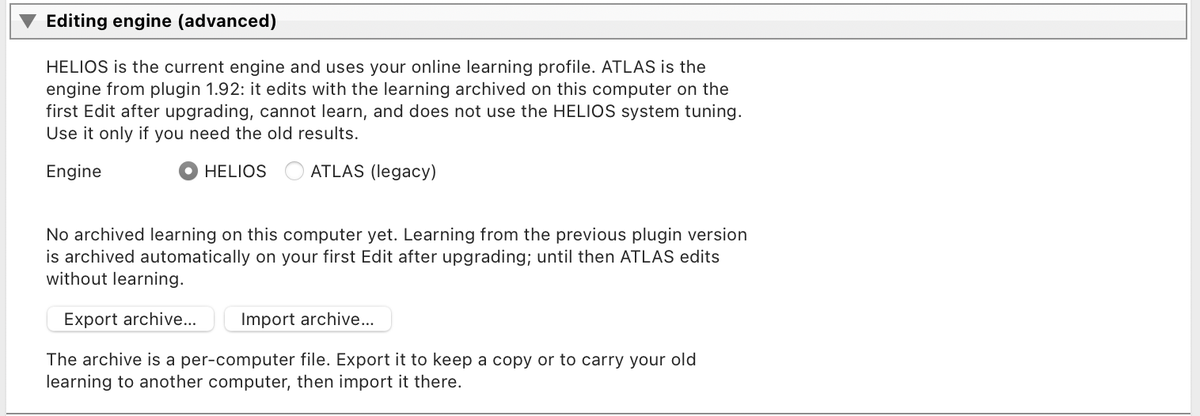
The choice takes effect on your next edit, with no restart or re-login. The Edit dialog shows an orange line whenever ATLAS is active.
What changes on ATLAS
- Edits use the 1.92 engine and the learning archived on this computer.
- Learn is disabled. Switch back to HELIOS to use it.
- The HELIOS system tuning and set-wide refinement are not applied.
- Quick Tune works as usual, but it measures against the active engine – re-run it after switching if you use your own tuning.
- Credits, plans and devices are the same on both engines.
Switching back and forth loses nothing. Your online learning profile, backup and archive stay untouched.
The archive is per computer
The archive is created once, on the first Edit after updating, on that computer. A second computer gets no archive of its own. To carry it over, click Export archive… on the first computer, copy the file, and click Import archive… on the second.
If the status line says "No archived learning on this computer yet" and you never used Learn in 1.92, that is normal. ATLAS still edits, just without learning.