
General troubleshooting

Everything in Impossible Things runs inside Lightroom Classic – there is no separate app to open or restart. If something is not working, start here.
Check System Status
Go to File ▸ Plug-in Extras ▸ Impossible Things ▸ System Status. It asks the server whether the Impossible Things services are online and shows any service message. Do this first for any "nothing works" problem. Editing and Learn need an internet connection.
"Please wait until the current Impossible Things edit is complete"
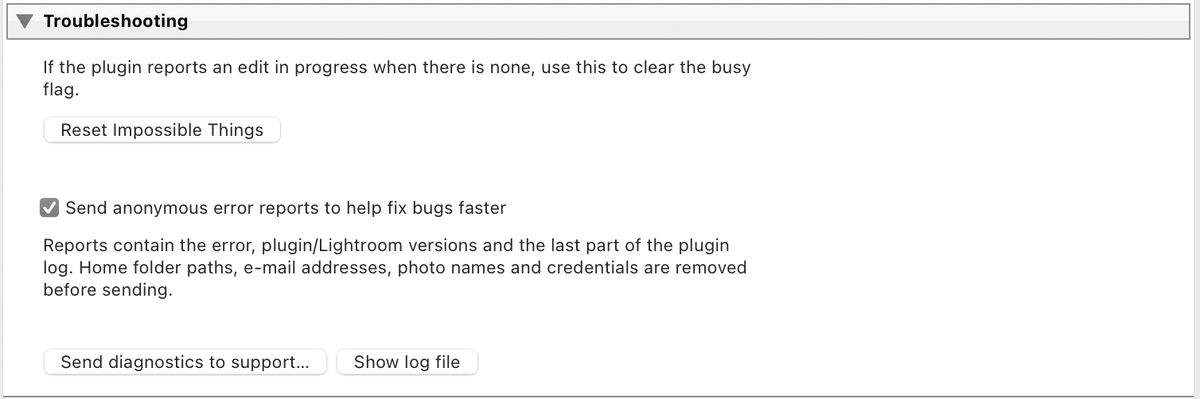
The plug-in runs one operation at a time. If you see this and nothing is running (for example after a crash or a force-quit): open File ▸ Plug-in Manager ▸ Impossible Things, and under Troubleshooting click Reset Impossible Things. Restarting Lightroom clears it too.
Error dialogs with a number
- 401 or 403: log out and log in again via Account Login.
- 408, 503 or 504: a connection problem. Check your internet and System Status, then retry.
- 500 or 502: a problem on the service side. Retry later; contact support if it persists.
If a whole batch fails, retry the photos that were not processed. On credit plans, credits for unprocessed photos are returned automatically.
Photos left out of an edit
Edit and Learn work on RAW and DNG photos. JPEG, TIFF, PSD, PNG and video are left out, and the plug-in tells you so. Support for JPEG and other non-raw images is planned for a future version.
Anonymous error reports
If something goes wrong, the plug-in sends an anonymous error report so the problem can be found and fixed. It does not include your email, account details, photos or any file paths – only what the plug-in was doing and what went wrong. To turn it off, untick Send anonymous error reports to help fix bugs faster under Troubleshooting in the Plug-in Manager. Nothing else changes with reports off.
What to send to support
- Your plug-in version (from the Plug-in Manager), Lightroom Classic version, and operating system with chip (Intel, Apple Silicon or Windows).
- The exact error text or a screenshot, the menu item you used, how many photos, and the camera or RAW type.
- Your account email. Never send your password.
- The plug-in log. The easiest way is File ▸ Plug-in Manager ▸ Impossible Things ▸ Troubleshooting ▸ Send diagnostics to support… – include your account email in your message so it can be matched to your ticket. Or click Show log file and attach
Impossible Things.log(for culling, addCulling.logandExecuteCulling.log).